Visible receivables and due dates
Review invoice totals, paid amounts and balances with their customers and dates. Link partial payments to records to follow how much of each receivable has been settled.

Track invoices, collections, expenses, cash and bank accounts, and instruments with transaction history.
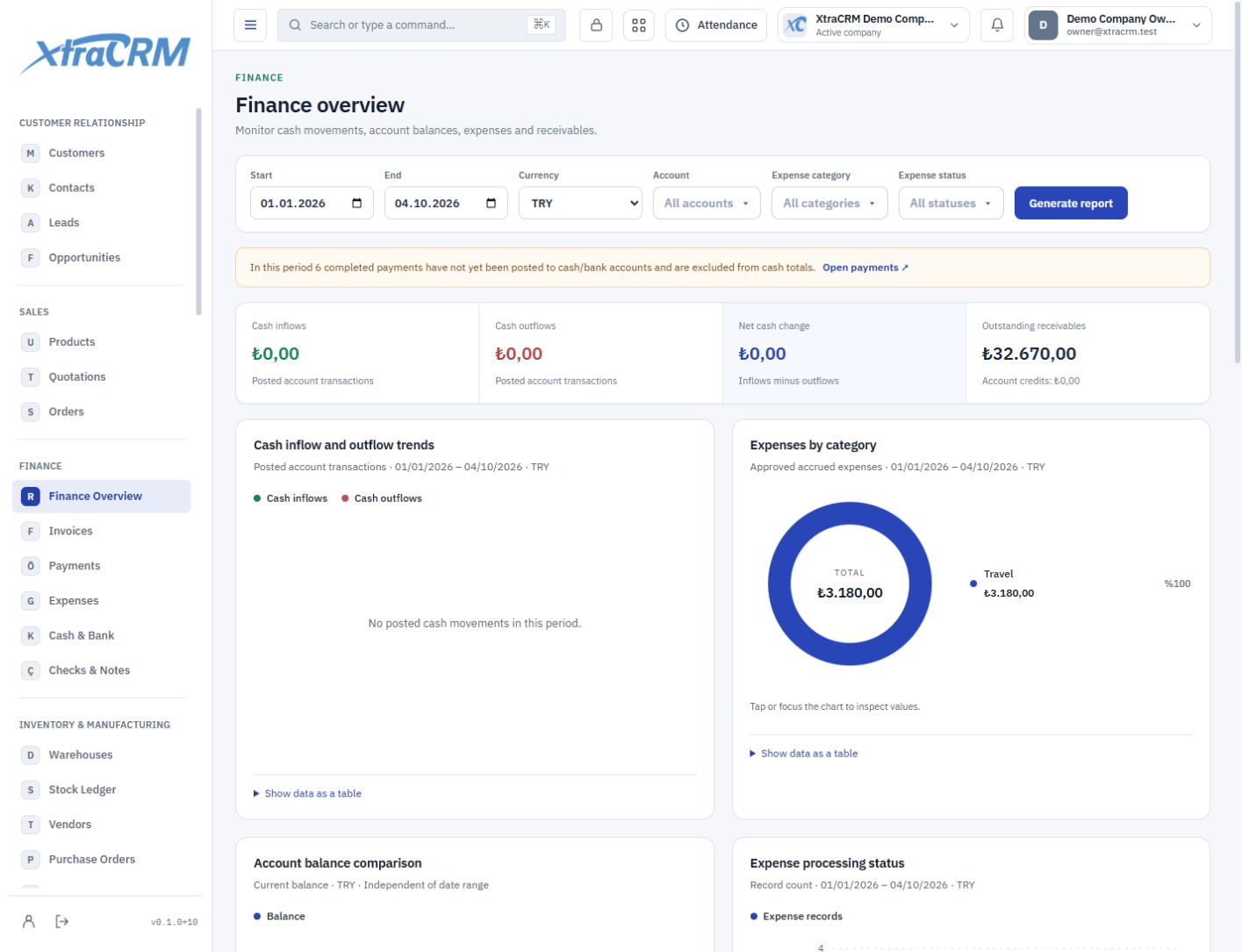
Sales value, collected payments and available cash are different things. Review invoices, payment movements and accounts together for a clearer view of your daily finances.
Review invoice totals, paid amounts and balances with their customers and dates. Link partial payments to records to follow how much of each receivable has been settled.
Reach the source of collections, payments, expenses, cash and bank movements. Review checks and other instruments with their due dates and statuses.
Select a period and currency in the finance overview to examine cash flows and distributions. Then open the underlying records for more detail.
See each section’s role before choosing your plan. The plan comparison shows what is included and what is not.
Review accruals and cash movements separately.
Track invoices, saved addresses, lines and collections.
Track partial payments with account and record links.
Track company expenses and employee reimbursements.
Review cash and bank movements by currency.
Manage instruments with parties, status and transaction history.
This page describes operational financial tracking. Statutory accounting, official tax filings and e-invoicing integrations are not promised in this scope. Discuss your integration requirements with our team.
Module coverage varies by plan. Compare the full module tree on the pricing page. Your company administrator also controls who can view, create, edit or delete records.