

Use cases
CRM and customer tracking for digital agencies
Manage campaign briefs, creative approvals and recurring contracts.
Illustrative case
A campaign retainer is expiring. Record the renewal date on the opportunity and schedule a follow-up 30 days ahead. While the account lead prepares the offer, the creative team keeps using its brief and approval board.
From new lead to client meeting
A prospect submits a campaign brief. Record the request and its source, then open an opportunity once the launch scope and budget are clear.
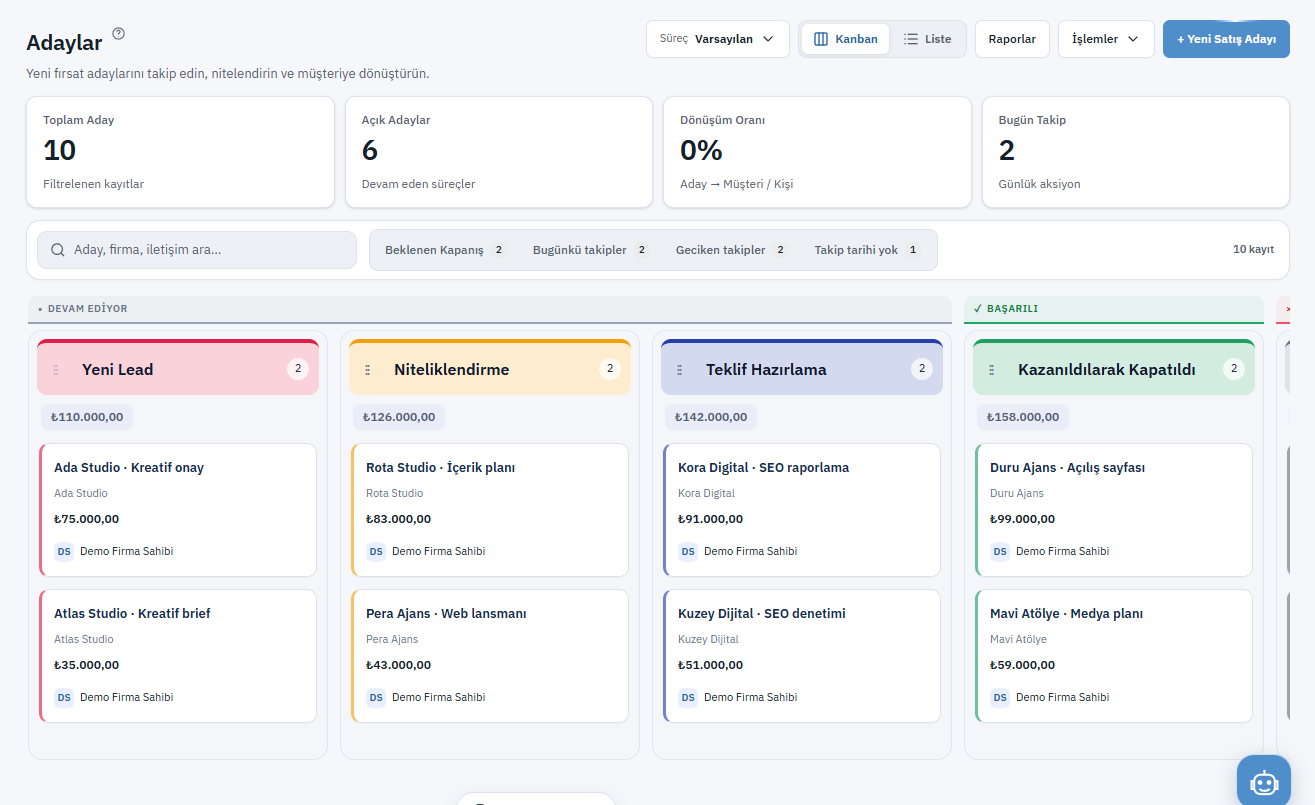
Leads
Keep each lead’s source, owner and conversation history together. Once the request is clear, continue tracking the sale as an opportunity.
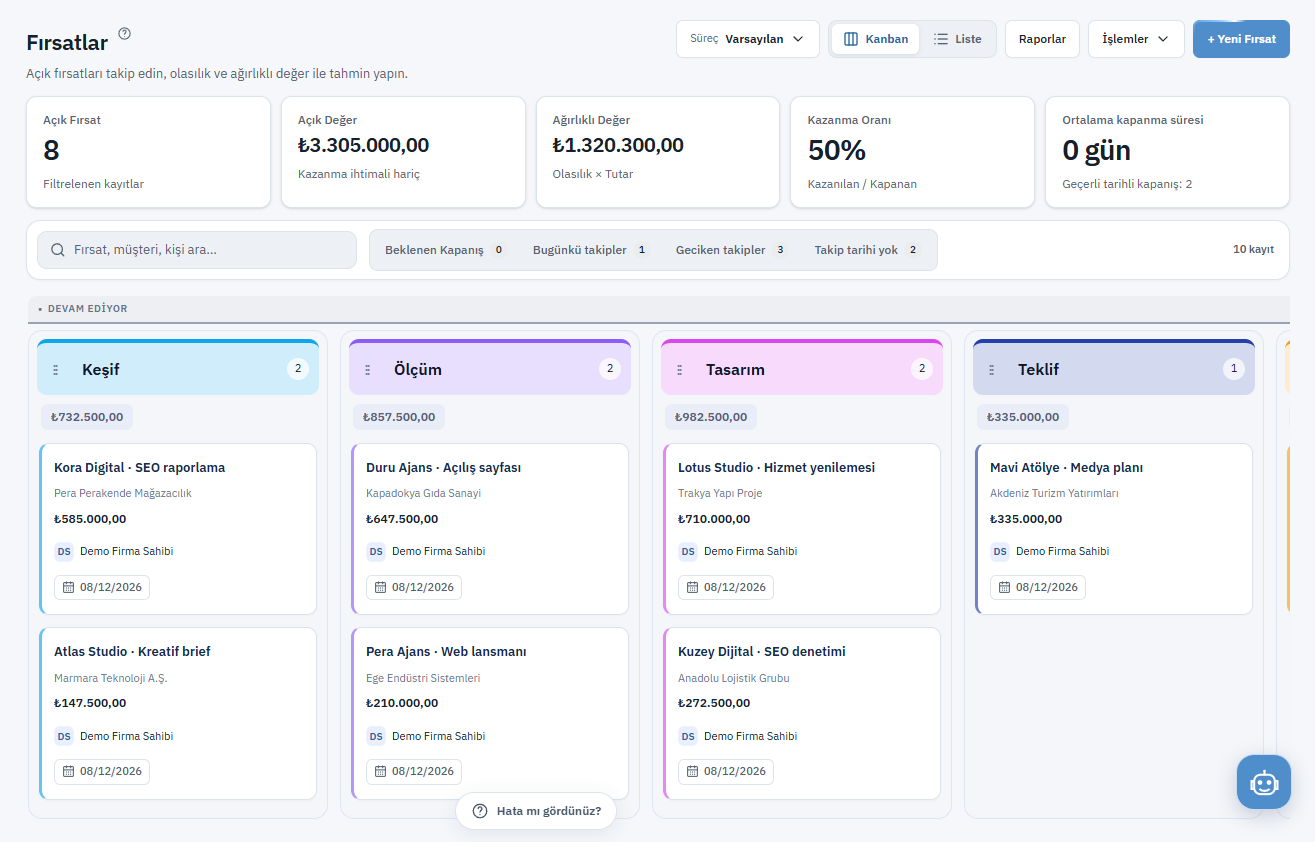
Opportunities
Track proposals by stage on the Kanban board. Set expected close dates and follow-up dates so the team knows which client to contact and when.
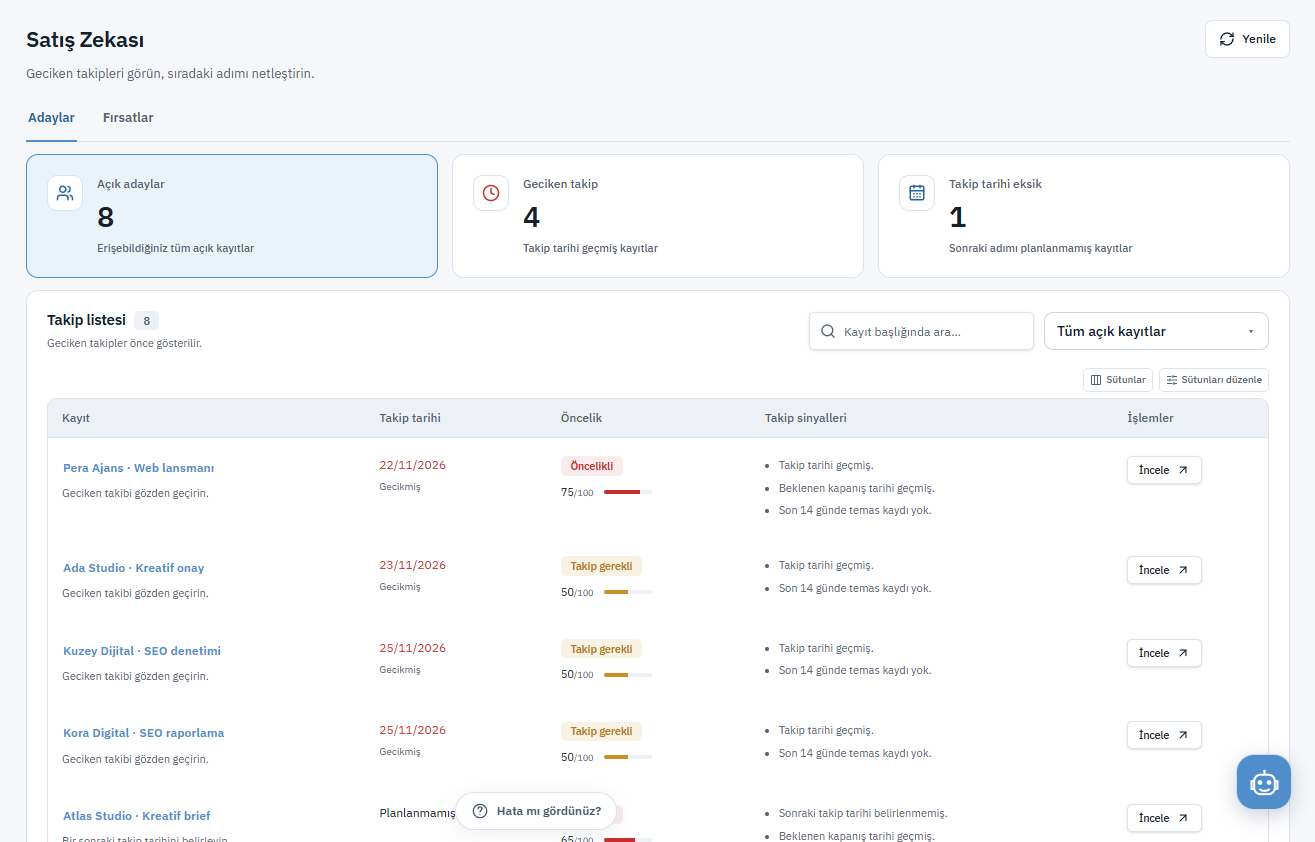
Sales intelligence
See overdue follow-ups, missing follow-up dates and other risk signals across leads and opportunities. Understand each priority, open the record in a side panel and plan the next step.
Mon
- 09:00
- 10:30
- 13:00
- 14:30
Tue
- 09:00
- 10:30
- 13:00
- 14:30
Wed
- 09:00
- 10:30
- 13:00
- 14:30
Thu
- 09:00
- 10:30
- 13:00
- 14:30
Fri
- 09:00
- 10:30
- 13:00
- 14:30
Campaign brief
· Google Meet
Scheduled
Appointment management
Create Zoom, Google Meet or Microsoft Teams meetings from a CRM appointment. The join link from your connected account is added to the appointment and shared with invitees.
- Zoom
- Google Meet
- Microsoft Teams
Renewal management
Review the campaign contract before it expires. Use the current scope and the client’s next campaign dates to prepare a renewal offer, then set a follow-up date on the opportunity.
Open the next term on schedule
Create a renewal rule from a successful service record. Set the reference date and recurrence. XtraCRM copies selected fields to a new record in the first active stage and notifies the people you select.
- Reference date field
- Renewal date
- Recurrence
- Every year
- When to open the new record
- 3 days before
New record opens
Renewal date
Smart Process
Move a creative brief through briefing, production and client review. Keep each revision on the same record so the team can see what is ready to publish.
To do
Campaign brief
In progress
Social ad visuals
In review
Client approval
Visual BPA designer
Design workflows without code for automation-enabled Kanban modules, including Opportunities and Smart Processes. Connect conditions, actions and each branch outcome in a visual designer.
Check the discount when a record is being moved to a stage. Continue the transition for standard discounts; send discounts of 10% or more to a manager.
When a record changes stage
Discount rate≥ 10%
Manager approval
Approve
Resume the pending stage transition.
Reject
Notify the record creator and keep the record in its current stage.
Revise
Request extra information through selected fields and wait for the response.
- Custom module
- Create your own module with fields for the client, owner, due date and files.
- Pipelines
- Define a separate pipeline for each workflow in the same module. Give creative approvals and contract renewals their own stages.
- Kanban
- Kanban columns show the pipeline stages. Move a card when the work advances and open it to see the owner and details.
- Renewals
- Set a renewal date on the record. For example, schedule follow-up 30 days before expiry and track the offer in the renewal pipeline.
- Reminders and notifications
- Schedule a reminder before a due date. Configure a rule to notify the owner when a record enters review.
- BPA automation
- Use the visual BPA designer to connect triggers, conditions and actions. For example, request approval when a record enters review, then create a publication task after approval or return it for revision.
Projects and tasks
Assign production, copy and ad setup to different owners in one campaign project. Use due dates to spot which handoff could delay launch.
- Scope and brief Campaign brief
- Creative production Social ad visuals
- Review and approval Client approval
Reminders
Set a reminder to check creative approval before the media booking deadline. If approval is pending, follow up while there is still time to move the slot.
Digital agencies
Review the next milestone
- Review the next milestone
- Client follow-up
Team Collaboration
- Tasks
- Create a banner task with dimensions, source files and a checklist for links, copy and mobile previews. Assign a designer and record the deadline and time spent.
- Projects
- Group web, content and media tasks into one launch project. Use the calendar and Gantt view to track handoffs and review the launch date when the site test slips.
- Operations
- For a monthly client operation, keep the owner, client and current stage on one record. Review whether the report is being prepared, awaiting review or already delivered.
- Flows
- Define who takes over from brief to production, approval and publication. Set target times for each step and inspect how long the work has waited in client approval.
- Scrum
- Put SEO findings into the backlog, then choose redirect and metadata fixes for a two-week sprint. Define done as verifying the final URL and metadata after release.
- Work Reports
- Set a weekly report plan. Have specialists share completed work, blockers and next steps. The manager can request a revision when an item lacks context.
- Performance
- Compare delivery times, workload and recorded work time before planning the next week. If design is overloaded, review assignments before accepting another deadline.
Frequently asked questions
What does a digital marketing agency do and how does it manage the customer process?
The digital marketing agency plans advertising, content, social media and web activities to reach the target audience of the brand. The business process usually begins with a request. The agency first learns the customer's goal, existing channels, expectations and budget range. It then decides what services will be offered and by what criteria success will be evaluated. For example, an e-commerce brand's form request may turn into an opportunity for ad management and landing page improvement after a discovery meeting.
In XtraCRM, you can write the source of the request and the next meeting, the scope of the offer to the opportunity and the decision date in the candidate record. When the job is won, you can transfer the approved deliverables to project tasks and define the responsible person and deadline for each task. At the first client meeting, record the campaign calendar, who will approve it, and when you will evaluate the results. When the team reviews open opportunities and upcoming deliverables together at its weekly meeting, a common work plan is created for both sales tracking and customer communication.
How to use CRM program for digital agency?
To populate your agency CRM from day one, start with three basic records. Company identifies the customer, person refers to the person you are meeting with at that company, and opportunity represents a separate sales possibility. If website design and advertising management are being discussed for the same company, you can open two different opportunities. Different budgets, decision dates and bid scopes thus remain in their own records. Connect the person with the company and keep updated on the next step at every turn.
In XtraCRM, first review your existing customers and active candidates. Instead of moving closed records, you can start with the conversations the team will be working on this week. Fill in the sales contact, request source, and tracking date. At the weekly meeting, open past due follow-ups and proposals approaching decision day. When a customer postpones a request, note the reason and enter the new meeting date. Once these habits are established, it becomes clear where to read the scope and customer expectations in the work assigned to the project.
How do agencies organize leads with a customer tracking program?
Initial contact can come via form, referral, introductory meeting or direct message. Open each new lead once in the customer tracking program and record its source, company, contact person and first request. Update the existing record for the candidate who contacted again. For example, if a brand both sent a message on Instagram and filled out an offer form, keep the history of both contacts in the first record instead of opening two different sales calls.
On the XtraCRM Candidates screen, your team can monitor which records will be searched, which are waiting for information, and which have turned into sales opportunities. When writing the interview outcome, set a responsible and follow-up date for each active candidate. Explain in a brief note why inappropriate requests were not moved forward. At the end of the week, instead of evaluating the channels only based on the number of candidates, also see which sources turned the interviews into qualified opportunities. This distinction helps you compare heavy application versus actual sales potential.
What is an agency sales funnel and how to set up opportunity stages?
The sales funnel shows the progression of leads from first contact to business won or lost. For an agency, discovery, scope clarification, proposal submission and client decision are straightforward initial stages. Define transition criteria for each stage. For example, when moving from discovery to scope, the customer's needs, approximate budget and decision maker should be clear. When the offer is sent, the offer date, follow-up day and who will receive feedback should be written on the opportunity.
On the XtraCRM Opportunities screen, you can see the records according to their stages on Kanban. If advertising management and web development require separate decision steps, create separate sales processes where appropriate. In a weekly check, examine the opportunities that have been at the same stage for a long time and the upcoming decision dates. Go back to the last interview note to see why a high-money offer was pending and update the follow-up plan if necessary. If you regularly write down the reasons for lost opportunities, you will notice scope, budget and timing problems earlier in subsequent proposals.
How to write the service scope in the digital agency proposal preparation program?
When preparing a proposal, first describe the work the customer will purchase. For example, for social media management, let the number of channels, post frequency, design submissions, meeting order and revision limit be clear. If the advertising management fee and the budget to be paid to the advertising platform are different items, show the prices separately. The access and contents expected from the customer before the work can start can also be written in the proposal. Thus, when the project is opened, the materials that the team expects to start are clear.
Track the offer with the relevant customer and sales opportunity in XtraCRM. If the scope changes during the discussion, update the new text and decision date. Determine with the project manager which works will be the first to be delivered based on the approved proposal. For example, on a website project that remains at the proposal stage until the contract is signed, check whether the customer content is ready before giving an exact date for the design. Once the quote is accepted, transfer the final file, price reconciliation, and exceptions to the project team in a single handover note.
How does a digital advertising agency track lead registrations from the Google Ads form?
The Google Ads form shows where the application came from. To understand whether the application is a real job opportunity, the agency needs to learn the candidate's need, budget range and timing. When saving the contact information from the form to the CRM, write down the campaign as much as you know. Determine the person responsible for the first meeting and list the applications to be returned within the day. When the same person leaves more than one form, keep the interview history in a single candidate record whenever possible.
In XtraCRM, you can watch the candidate's advertising source, last interview result and next step together. The transfer method varies depending on the connections you use. For example, if you are entering form data manually or transferring it through an integration, check on the first sample records that the company and phone fields match correctly. Include candidates contacted, discovery calls, and opportunities offered along with the total number of forms in the weekly report. In this way, you can separately evaluate the volume of advertising and which applications the sales team generates business from.
How to use the appointment tracking system for the agency in discovery meetings?
When creating an appointment for a discovery meeting, specify the customer, internal contact person, the subject of the meeting and the information required for preparation. The customer's current advertising channels, sample business tastes or the name of the person who will make the decision may be details that need to be known before the meeting. If a calendar entry also creates a task for the team, for example if a preliminary review is required, assign the relevant work as a separate task. Postponing the appointment may also change the date of the preparation task.
You can follow upcoming meetings in the shared calendar on the XtraCRM Appointments screen. Once the conversation is complete, update the budget, contact, expected outcome, and next step on the relevant lead or opportunity. If a candidate who wants to renew a website will send sample sites after the meeting, plan the follow-up according to this date. Review the conversations that took place, postponed and awaited return in the weekly list. Since the meeting history and decisions remain on the record in case of team change, the new responsible person can move forward without asking the same questions to the customer again.
How to make a social media content calendar and track customer approval?
When preparing a content calendar, determine the client, channel, format, broadcast day and preparation person for each publication. If copywriting, design, and client approval are handled by different people, schedule the completion date for each step back from the publication date. For example, for a video to be published on Friday, final editing can be targeted on Wednesday and customer approval can be targeted on Thursday. For jobs that may be delayed, select the alternative publication option in advance.
You can open the job as a project task in XtraCRM or create a dashboard specific to content production in Smart Process. Draft, design, customer approval, and ready-to-publish columns show the team who has which job. Specify the person who approved and the accepted version on the record. If a revision occurs, note the date of the request, the scope of the change, and the current submission. Once published, add the link and close the task. In the monthly evaluation, you can add more realistic preparation time to the next month's delivery schedule by examining the delayed works, especially at the approval stage.
How to plan monthly service renewal with the agency contract tracking program?
For monthly service agreements, keep the customer, service type, start and end date, decision maker, and renewal contact in separate areas. If the decision to extend the period is only finalized after discussion with the customer, allow sufficient time for proposal preparation before closing. For example, compiling the results one month before the end of the advertising management agreement, learning the customer's new goals and pricing the current scope can be planned as three separate tasks.
In XtraCRM, you can determine records with renewal dates and create reminders for upcoming meetings. Define stages such as renewal negotiation, quote submission, and conclusion in a dedicated customer service process. If additional service is requested, clearly state in the new proposal which work comes from the existing agreement and which is added. When the decision is postponed, update the next meeting date and interim service scope. Once the renovation is complete, record the new start and end dates. This way, the finance team and the operations team look at the same period and reconciliation.
How to switch from Excel to CRM for customer tracking for a digital agency?
Before you begin migrating from Excel, determine what each row represents. If a row contains both company, person and open offer information, separate them into separate columns or files. Check for duplicate records of the same email and phone number. You don't have to move unused history columns. You can select active customers, open candidates, pending offers, and upcoming contract renewals as the first dataset to migrate.
Before switching to XtraCRM, verify the company name, contact, email and responsible matching on a small sample group. Dates and currencies should especially be checked. Ask a project manager to open a sample customer and find the proposal scope and next step. If this attempt is successful, move the other records and let the team know from what date the old table will become archive only. In the first week of the new layout, examine duplicate records, missing ownerships, and outdated tracking and simplify the fields you use.
Your company’s size does not limit your access to XtraCRM features.
All system features are included in every plan.
And all the features still to come...
* Excludes the free plan.Starter
45 $
35 $
/ month
9 $
7 $
per user / month
420 $ / year
– better value
Billed monthly.
All modules included
- 5 users
- 10 GB storage
Growth
FOR GROWING TEAMS
105 $
75 $
/ month
7 $
5 $
per user / month
900 $ / year
– better value
Billed monthly.
All modules included
- 15 users
- 25 GB storage
Prefer to use your own server? · Talk to our team
Let's take the first step together
Let's talk about the bottleneck in your business.
Let's show the solution in the product.
Get advice from our experts. Let's talk about how XtraCRM can be used in your business, suitable packages and initial steps.
- Evaluation according to your business processes
- Support on package and module selection
- Your installation and data migration questions
Prefer to write directly?
[email protected]