

Use cases
Project management for 360° advertising agencies
Coordinate web, content and media teams around one client account.
- Website delivery Website QA
- Content delivery Landing page copy
- Media setup Media plan
Illustrative case
A launch needs a website, content and ads. Put them in one project, assign owners and deadlines, and route client approval through a Smart Process. Remind the project lead about milestones before launch.
From new lead to client meeting
A client wants a website launch with content and media support. Record the request, then open one opportunity to track the joint proposal.
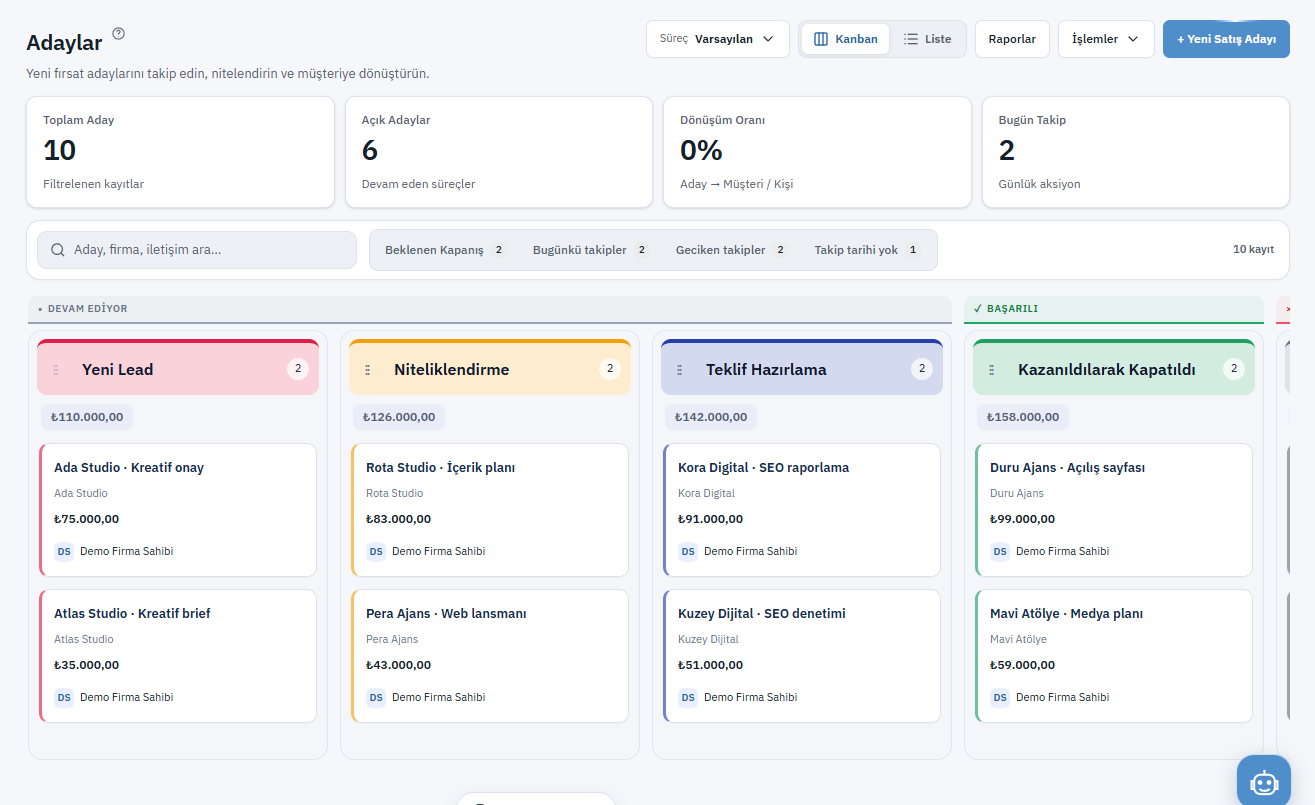
Leads
Keep each lead’s source, owner and conversation history together. Once the request is clear, continue tracking the sale as an opportunity.
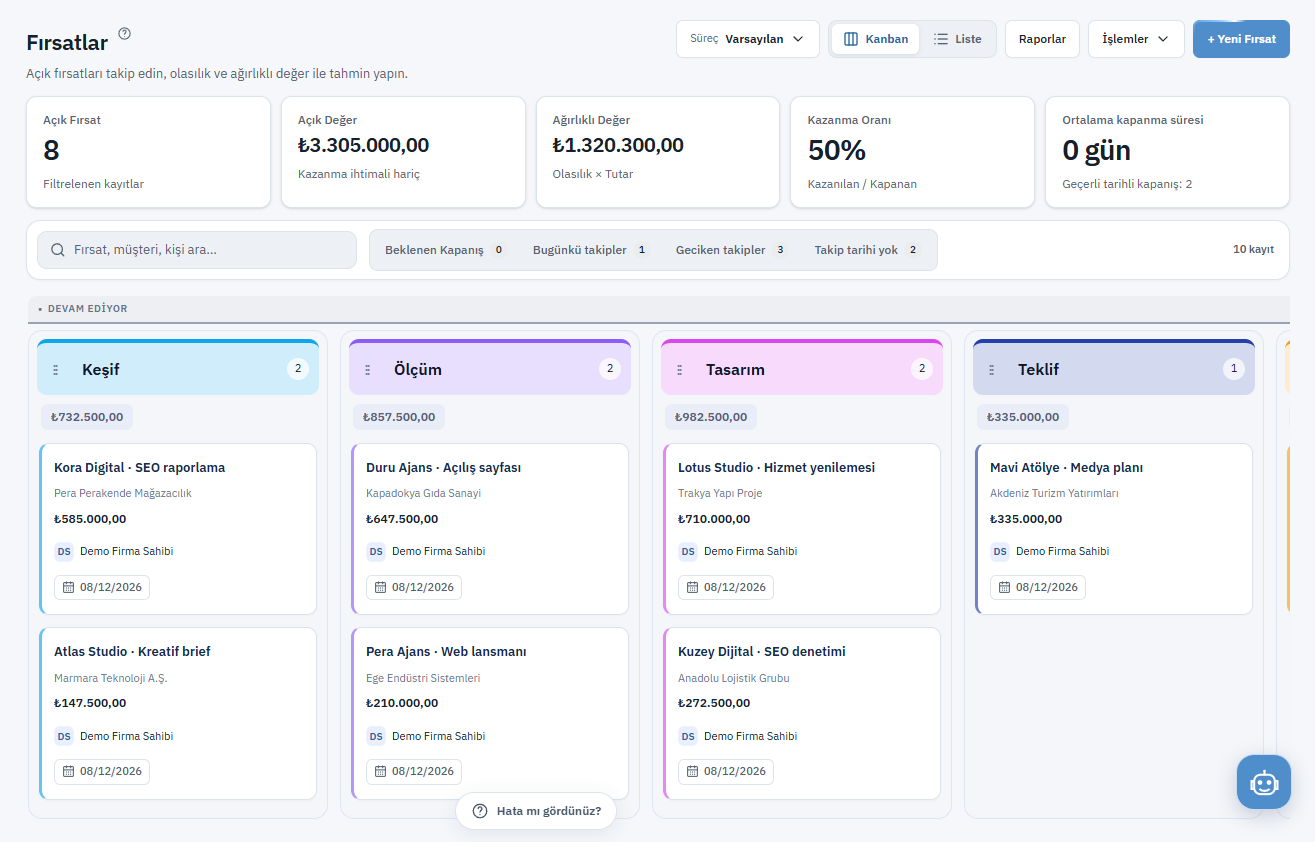
Opportunities
Track proposals by stage on the Kanban board. Set expected close dates and follow-up dates so the team knows which client to contact and when.
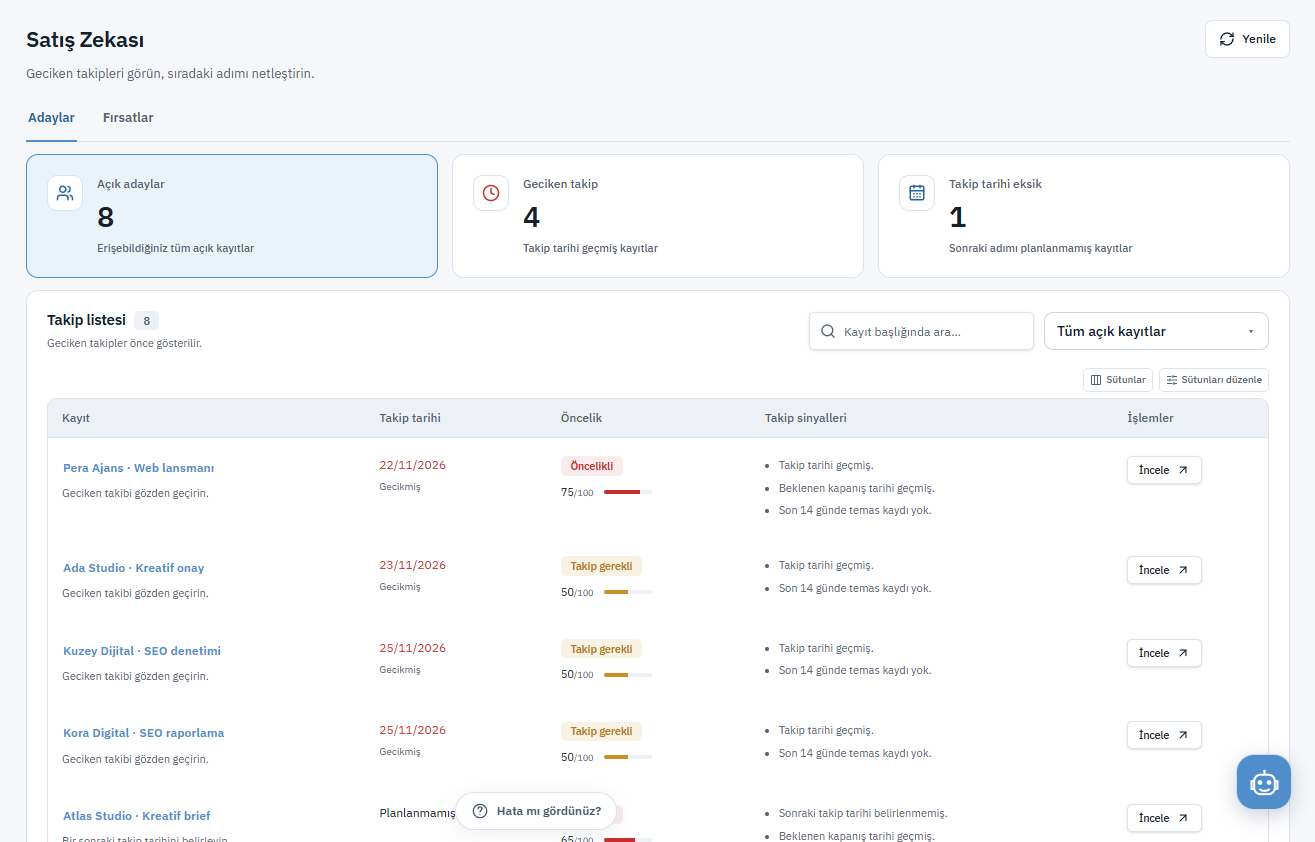
Sales intelligence
See overdue follow-ups, missing follow-up dates and other risk signals across leads and opportunities. Understand each priority, open the record in a side panel and plan the next step.
Mon
- 09:00
- 10:30
- 13:00
- 14:30
Tue
- 09:00
- 10:30
- 13:00
- 14:30
Wed
- 09:00
- 10:30
- 13:00
- 14:30
Thu
- 09:00
- 10:30
- 13:00
- 14:30
Fri
- 09:00
- 10:30
- 13:00
- 14:30
Website QA
· Google Meet
Scheduled
Appointment management
Create Zoom, Google Meet or Microsoft Teams meetings from a CRM appointment. The join link from your connected account is added to the appointment and shared with invitees.
- Zoom
- Google Meet
- Microsoft Teams
Projects and tasks
Keep website QA, content delivery and media setup under the same launch project. Give each team its own due dates while keeping the shared launch milestone visible.
Smart Process
Create a change-request board with requested, scoped, approved and scheduled stages. Track a late request for an extra landing page before it changes the whole project timeline.
To do
Website QA
In progress
Landing page copy
In review
Media plan
Visual BPA designer
Design workflows without code for automation-enabled Kanban modules, including Opportunities and Smart Processes. Connect conditions, actions and each branch outcome in a visual designer.
Check the discount when a record is being moved to a stage. Continue the transition for standard discounts; send discounts of 10% or more to a manager.
When a record changes stage
Discount rate≥ 10%
Manager approval
Approve
Resume the pending stage transition.
Reject
Notify the record creator and keep the record in its current stage.
Revise
Request extra information through selected fields and wait for the response.
- Custom module
- Create your own module with fields for the client, owner, due date and files.
- Pipelines
- Define a separate pipeline for each workflow in the same module. Give creative approvals and contract renewals their own stages.
- Kanban
- Kanban columns show the pipeline stages. Move a card when the work advances and open it to see the owner and details.
- Renewals
- Set a renewal date on the record. For example, schedule follow-up 30 days before expiry and track the offer in the renewal pipeline.
- Reminders and notifications
- Schedule a reminder before a due date. Configure a rule to notify the owner when a record enters review.
- BPA automation
- Use the visual BPA designer to connect triggers, conditions and actions. For example, request approval when a record enters review, then create a publication task after approval or return it for revision.
Reminders
Remind the project lead two days before launch to check client approval, tracking links and publication access while there is still time to fix missing items.
Full-service agencies
Review the next milestone
- Review the next milestone
- Client follow-up
Renewal management
Before a quarterly agreement ends, review web, content and media deliverables together. Use the agreed scope for the next period to prepare one renewal proposal.
Open the next term on schedule
Create a renewal rule from a successful service record. Set the reference date and recurrence. XtraCRM copies selected fields to a new record in the first active stage and notifies the people you select.
- Reference date field
- Renewal date
- Recurrence
- Every year
- When to open the new record
- 3 days before
New record opens
Renewal date
Team Collaboration
- Tasks
- Create a banner task with dimensions, source files and a checklist for links, copy and mobile previews. Assign a designer and record the deadline and time spent.
- Projects
- Group web, content and media tasks into one launch project. Use the calendar and Gantt view to track handoffs and review the launch date when the site test slips.
- Operations
- For a monthly client operation, keep the owner, client and current stage on one record. Review whether the report is being prepared, awaiting review or already delivered.
- Flows
- Define who takes over from brief to production, approval and publication. Set target times for each step and inspect how long the work has waited in client approval.
- Scrum
- Put SEO findings into the backlog, then choose redirect and metadata fixes for a two-week sprint. Define done as verifying the final URL and metadata after release.
- Work Reports
- Set a weekly report plan. Have specialists share completed work, blockers and next steps. The manager can request a revision when an item lacks context.
- Performance
- Compare delivery times, workload and recorded work time before planning the next week. If design is overloaded, review assignments before accepting another deadline.
Frequently asked questions
What is a 360 degree advertising agency and how does it manage different services?
360 degree advertising agency responds to a brand's communication needs by using different expertise such as strategy, creative, digital media, content and production. Most of the time the customer wants a single launch, but there are many teams and dependencies behind the delivery. For example, ad delivery depends on the availability of the approved image and landing page. Determining the scope, cost, deadline and person who will approve each service when opening the project reduces the uncertainties that may arise later.
In XtraCRM, you can track customer and quote information in CRM and service tasks within the project. Indicate in the mission plan which team's input is needed before delivery. Instead of re-reading each channel's report at the weekly management meeting, look at critical deliverables, work awaiting approval, and date changes. Setting up this setup initially for a single client makes it easier for creative and media teams to understand what information to see and where. You can adapt the same structure to the scope of service in subsequent projects.
How to set up a project management program for a 360 degree agency?
When setting up the project management program, first list the agency's recurring deliverables. For example, in a launch, strategy presentation, creative concept, media plan, production and launch are different pieces of work. Give each piece a principal and a verifiable delivery date. Make visible at the beginning where things are waiting for each other. If the video delivery day is approved before the shooting date is finalized, write in the project plan which decision depends on the two recordings.
You can open work packages by customer name and follow the responsibilities of team members on the XtraCRM Projects and Tasks screens. The project manager evaluates delayed deliveries, customer approval and scope changes together in the weekly control. If work comes in that is not included in the proposal, first explain its impact on the project plan and record the client's additional scope decision. By comparing the first plan with the actual deliveries, you can determine which stage you need to allocate more time to in the subsequent works. Having the same checkpoints in every project makes turnover between teams predictable.
How to transfer work between teams with a task tracking program in an advertising agency?
For turnover to work, the new principal must be able to understand the expected outcome and the files they will use when they open the task. For example, when the visual prepared by the creative team is transferred to a media team, the platform, size, delivery version and publication date should be specified. If only the filename is submitted, the team will retain which version received final approval. If acceptance criteria are written in the assignment, the acquirer knows where to start the checks and requests the missing input in a timely manner.
In XtraCRM, you can keep the due date, priority, responsible person and required links visible in the project task. When the transferring team completes the work, it adds the relevant file or reference to the record. The taking over team notes the person who made the decision in a situation that required approval. Instead of reading the entire list in the meeting, look at tasks that are due and waiting for another team. When the project manager determines a new date for a delayed transfer, the explanation to the customer will be clearer if he also records the impact of this change on the campaign calendar.
What is workflow automation in agencies and when is BPA used?
Workflow automation initiates steps with defined rules that the team repeats over and over again when a certain situation occurs. First write down which event triggered the process. For example, when the creative work reaches customer approval, a notification can be made to the project manager, and when approval is selected, a task can be given to the publication manager. If there are different exceptions for each customer, choose the process that repeats most frequently and has clear rules first. Define the approval person where human judgment is required.
You can configure the trigger, conditions and follow-up steps in XtraCRM's Workflows (BPA) feature. Test the automation's operation with a sample recording first. Check who is notified when the person who approves changes and which step is reopened when a revision is requested. The criterion of success for the team should not only be the operation of the rule. When the approval waiting time, the number of unassigned tasks and delayed deliveries are regularly monitored, it can be seen at what stage automation makes a difference.
How to prepare an agency brief and track missing information?
A good brief brings together the client's purpose, target audience, deliverable, budget limit and approval deadline. In a brand renewal brief, the current visual language, the assets to be protected and the media to be used may be separate topics. Release date, product features and regulatory approval requirements may be more important in the launch effort. Use the same basic fields in every project. If there is missing information, write down who will complete it and by when the information will be needed.
With XtraCRM Smart Process, you can define fields and stages suitable for your business in brief records. For example, it separates the draft, client information awaited, and production-ready steps on which brief teams can work on. For the brief to be considered ready, the responsible manager can approve the final version and scope of delivery. Associate the subsequent change with the same record and specify the tasks it affects. In this way, the team that starts the design works without confusing the initial expectation in the sales call with the customer's final decision.
How are customer approval and revision tracking done in agencies?
Record customer confirmation in the delivery log rather than leaving it as a chat message. For each approval, write down which file version was accepted, on what date, and by whom. In revision requests, separate visual changes, text changes, and new requests that affect scope. For example, while color adaptation of a design may be a short edit, requesting a different size and content for the new medium may affect the plan. Indicate with whom the new delivery date was agreed.
In XtraCRM, you can progress the project task or custom process card according to the approval and revision stages. Clearly mark the final draft the team worked on and the version the client accepted. Note which deliverables apply to partial approval in cases where a rapid release is required. During the weekly check-up, share the tasks that have been waiting for an answer for a long time with the responsible people. Examining the reasons for revision at the end of the process allows you to evaluate whether the delivery criteria were written clearly enough at the proposal stage.
How to do agency capacity planning and balance deadlines?
The first step in capacity planning is to make visible the work undertaken by the team in the same period. For each job, record the job type, responsible person, approximate duration, and due date. If a designer is assigned to the final delivery of three campaigns in the same week, it can be difficult to notice this crunch just by looking at the number of tasks. Also consider preparation, customer wait time, and the possibility of rework when planning. Keep fixed release dates visible in the list with priority.
In XtraCRM, you can review upcoming deliveries, assigned people and open jobs through project tasks. If using work reports, compare actual time to initial estimate. When a new urgent request comes, determine with the project manager which existing work can be postponed and record the change if customer approval is required. Determine which step is waiting for the busiest team in the weekly meeting. Regularly measured workload helps you give more realistic delivery dates for subsequent quotes.
How to match media planning and creative production in 360 degree agencies?
The media plan shows release dates, platforms, formats to be used, and budget assumptions. The creative production plan covers the design, text, video and approval deliveries that will make these publications possible. To link the two plans, specify the relevant creative task and approval deadline in each media output. For example, if the same video is requested for different durations for two platforms, both deliveries must be ready before the broadcast day.
In XtraCRM, you can bring together media and creative managers for each campaign under the project. Write in the relevant task which release in the calendar will change when production is delayed. When a new format is opened, check whether the job is a scope change or an adaptation already in the plan. In the pre-publication meeting, review only the deliverables that are ready and the decisions that will be required on risky dates. Once work is complete, keep accepted files and campaign learnings linked to client records.
How to manage agency service agreement and scope change?
The delivery list, service period, revision conditions and customer approval process should be clearly written in the service contract. In intra-agency tracking, it should be particularly visible which services are within the monthly scope, which jobs are priced separately and who will give scope approval. For example, if a new product shooting request comes while there is design support in the monthly agreement, the production day, cost and delivery plan are first clarified with the customer. Once consensus is reached, project tasks are updated.
In XtraCRM, you can open a Smart Process as needed for the contract period, renewal date and scope notes. Link the additional scope request to the customer and relevant project record and track the submitted quote and decision date. When the process progresses, transfer the updated scope to the customer and all responsible persons within the agency through the same record. Before the renewal meeting, reviewing the recently added deliveries and the actual working hours makes it easier to explain the scope and price of the next period.
How to set up file order in agency content management and production projects?
Separating content and production files by client, project and delivery type is the first step. Use the date or version number in the file name. Names and accesses should be distinguishable if the raw footage, editing draft, and client-approved delivery remain in the same folder. For example, define social media adaptations of the launch video separately from the main cut. The team shouldn't have to read the last message and guess the version to find the file to go live.
In XtraCRM, you can keep the delivery visible by attaching the relevant file or access link to the project task. Record the approval date and the person who gave approval for the file shared with the customer. Determine which files the external team can see when they join the work, based on the scope of the work. After publication, add notes about final delivery and campaign performance to the project history. For the next project, review which files the team searches for most and refine the folder structure according to the actual working order.
Your company’s size does not limit your access to XtraCRM features.
All system features are included in every plan.
And all the features still to come...
* Excludes the free plan.Starter
45 $
35 $
/ month
9 $
7 $
per user / month
420 $ / year
– better value
Billed monthly.
All modules included
- 5 users
- 10 GB storage
Growth
FOR GROWING TEAMS
105 $
75 $
/ month
7 $
5 $
per user / month
900 $ / year
– better value
Billed monthly.
All modules included
- 15 users
- 25 GB storage
Prefer to use your own server? · Talk to our team
Let's take the first step together
Let's talk about the bottleneck in your business.
Let's show the solution in the product.
Get advice from our experts. Let's talk about how XtraCRM can be used in your business, suitable packages and initial steps.
- Evaluation according to your business processes
- Support on package and module selection
- Your installation and data migration questions
Prefer to write directly?
[email protected]