

Production, trade and logistics
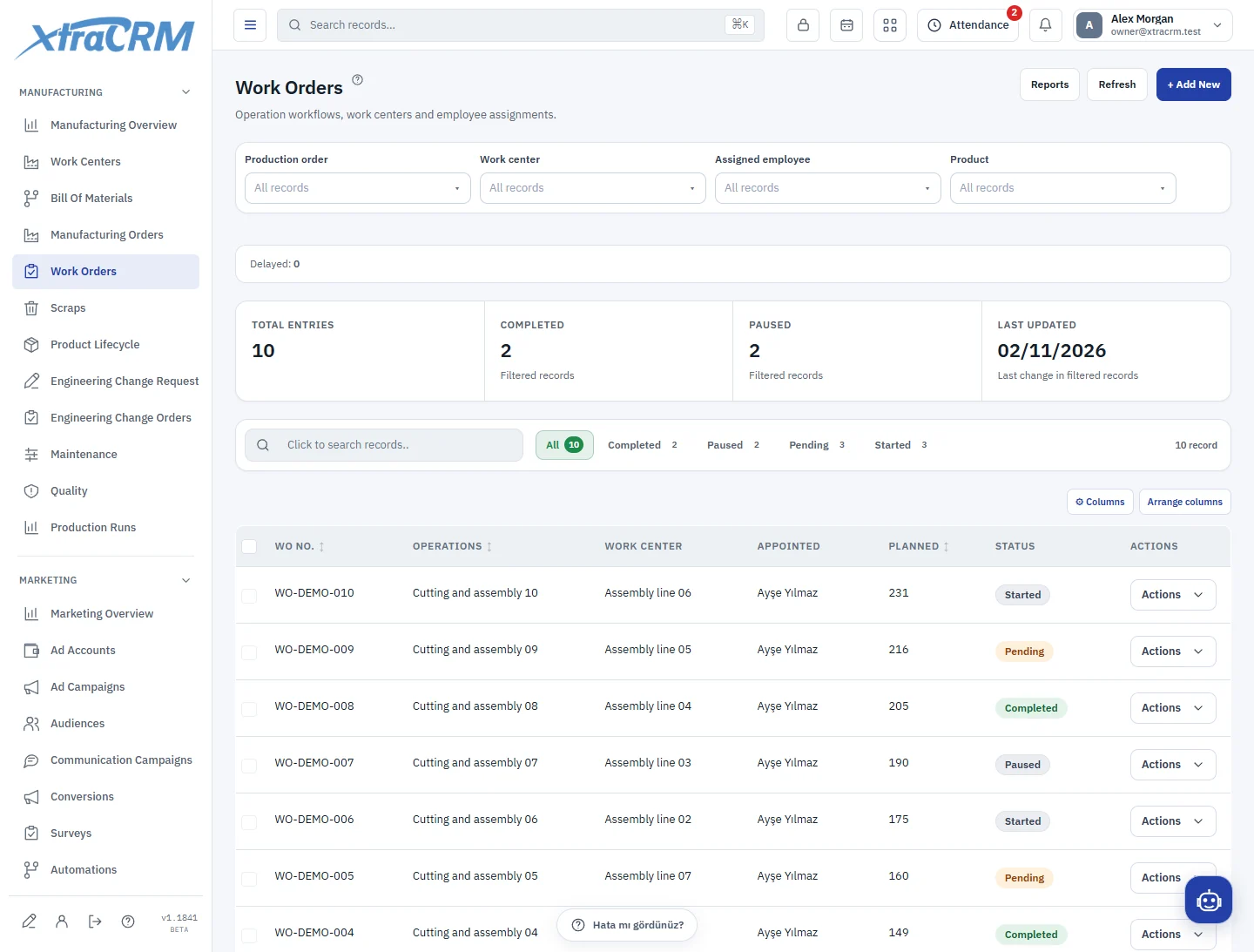
Manufacturing order and work order tracking
Track customer order revisions, material requirements and work order progress from sales through production.
When is the order ready for production?
In the made-to-order workshop, the sales team collects the quantity, the version of the technical drawing and the deadline. The planner checks the bill of materials and the material in the warehouse. The production manager opens the job, the operator records the progress on site.
Where is work failing?
- When the drawing is updated, the work order continues with the old version.
- The physical count in the warehouse does not match the recorded balance.
- Information about scrap and downtime is lost between shifts when the work order is closed.
Sample workflow
Production of 60 fittings
A machine manufacturer requires 60 fittings. The final version of the drawing is approved. The planner checks the bill of materials and the available quantity of critical raw materials before the shift begins. The delivery promise is notified to the customer according to the actual date given by the planning.
-
Confirm technical scope
Standardize part code, quantity, deadline and drawing revision in the quote. If the customer changes the design, review the new version with the order.
- sample record
- Connector · Revision C
-
Plan materials and work
Compare the bill of materials with the requirements list. Plan the supply of the missing raw material before the production date, open a work order for the approved scope.
- sample record
- 60 pieces Aluminum block
-
Close actual production
Enter the quantity into the production record and any downtime or waste notes, if any. Share the ready-to-ship quantity with the sales team.
- sample record
- 58 solid · 2 fire
How to solve it with XtraCRM?
- Production
- Make bill of materials, work orders, work centers and maintenance plans visible to the production team.
- inventory
- Record warehouse movements for raw materials, semi-finished goods and finished goods. Compare the recorded quantity with the actual count.
- sales
- Follow customer deadlines with quotes and orders. Compare the sales requisition with the actual quantity of the workshop.
Frequently asked questions
How to prepare a production work order?
Start by confirming the confirmed order scope, finished product code, target quantity, and date the job will be performed.
When setting up the first record, separate the fields that describe the job and the fields needed to make the decision. The customer or request reference, who the record owner is, and the next return date should have the same meaning to the team. If any information is missing, leave it blank and assign the task to the person who will complete it. When the person taking the recording changes, it is necessary to be able to read the previous conversation, the commitment given to the customer and the open question in one place. Open records with no defined responsible person or date can be handled separately in the weekly control. Include the custom field only for information that will actually be used.
Follow this step in the sample workflow. Standardize part code, quantity, deadline and drawing revision in the quote. If the customer changes the design, review the new version with the order.
How to plan material requirements with a bill of materials?
Check the quantity per piece in the BOM. Then compare the requirement multiplied by the number of work orders with the available quantity in the warehouse.
Planning the amount, recording the physical movement, and explaining the difference are different steps. Save the relevant warehouse, unit of measure, and document reference. If a promise will be made to the customer based on the balance shown before the transaction is made, confirm with the warehouse manager. In case of partial entry or exit, process the actual work first and determine the date and responsible person for the remaining work. Write the reason for a record with a count difference and the person who made the decision. This way, in the next meeting, the team can check where the amount comes from. Check that the sales, purchasing and warehouse team are using the same unit.
Follow this step in the sample workflow. Compare the bill of materials with the requirements list. Plan the supply of the missing raw material before the production date, open a work order for the approved scope.
How to track deadlines in production?
Tie the delivery date given to the customer to the target close of the work order. Set interim dates for raw materials, operations and quality control.
Separate the target date of the job, the time the customer will be notified, and the actual date of the completed transaction. If an appointment or task changes, check the jobs that will start after that. If confirmation from another team is required, set a delivery date for that confirmation as well. Show the relevant record and the person responsible next to the calendar. Thus, the person reading the calendar at the meeting does not have to search for correspondence regarding the status of the work. Direct the reminder before the completion date to the person who can take action. In the weekly plan, start with the commitments made to the customer first.
Follow this step in the sample workflow. Compare the bill of materials with the requirements list. Plan the supply of the missing raw material before the production date, open a work order for the approved scope.
How to record quality control and wastage in production?
Record finished quantity, accepted quantity and wastage separately. If there is a nonconformity, link the job to be monitored and the person responsible to the production record.
Let each item on the checklist produce a verifiable result. Before a box that says "done", include information about who checked it, when and from which source. If a document or photo is required, associate it with the correct file space. If there is a deficiency, instead of advancing the closing date, open a correction task and assign a person to re-check. The result reported to the customer and the internal approval record should be seen in the same job. Have the team decide from the beginning the evidence required to consider a job closed, and indicate any obvious exceptions in the report.
Follow this step in the sample workflow. Enter the quantity into the production record and any downtime or waste notes, if any. Share the ready-to-ship quantity with the sales team.
How to transfer a sales order to production?
Collect the approved order, drawing revision, and customer deadline in the same work note accessible to the production manager.
When delegating work, specify what decision the new responsible person will make or what output he will produce. Show the last approved document, the changed conditions and the date given to the customer in the same task. The opposing team does not have to open the first record again, but can access the previous notes through the associated record. Check authority and access limits before assigning tasks. You can design a separate notification or approval step for the relevant team when the condition is met. In order to understand that the transfer is completed, the acceptance status and the next step should be recorded.
Follow this step in the sample workflow. Standardize part code, quantity, deadline and drawing revision in the quote. If the customer changes the design, review the new version with the order.
How to follow planned machine maintenance?
Compare the target date in the production machine's maintenance plan with the shift plan. If there is a conflict, determine a new work or maintenance time.
The end of the contract, the beginning of the new term and the lead time required in the calendar for preparation are different areas. As a team, determine which event the date represents. In the renewal rule created from an appropriate successful record in Smart Process, you can select the reference date, repeat interval and authorized persons to be notified. Check the areas to copy and check the first refresh preview. The work remains dependent on the period in which the transaction was made. An employee's duty to review the contract is not the same as a customer's acceptance of new terms.
Follow this step in the sample workflow. Compare the bill of materials with the requirements list. Plan the supply of the missing raw material before the production date, open a work order for the approved scope.
How to monitor price and scope in a custom fabrication quote?
Write the material, technical conditions and revision clearly next to the part code and quantity. Reserve the customer-approved version.
The total agreed upon in the sales quotation and the open balance to be collected are different business records. Match the order scope, approved amount, payment date, and actual transaction to the relevant customer or supplier. Let the authorized person confirm the amount whose due date has changed. Record the document and the person responsible for an expense that is discovered later. In weekly control, distinguish which amount has been collected and which is awaiting approval or maturity. Thus, when the operation is completed, the unfinished business of finance remains visible. If formal action is required, associate the result with the relevant action reference.
Follow this step in the sample workflow. Standardize part code, quantity, deadline and drawing revision in the quote. If the customer changes the design, review the new version with the order.
What numbers are tracked for production performance?
If the planned and actual quantity, wastage and reasons for delay are seen separately in the work order, the shift meeting proceeds with concrete decisions.
Tailor the report to the decisions the team will make that week. Separate tasks with single-meaning situations such as completed, pending, and overdue. It should be clear which responsible person will act on which date. Instead of just looking at the number of registrations at the meeting, examine the reason for the delayed work and the customer it affects. Open a separate remediation task for recurring issues. Teams should fill out the date and status fields in the same way to understand the same period. When interpreting the results, do not confuse opened work, completed delivery and confirmation pending records.
Follow this step in the sample workflow. Enter the quantity into the production record and any downtime or waste notes, if any. Share the ready-to-ship quantity with the sales team.
How to manage open work orders if the technical drawing changes?
Identify the current drawing and check which open order and transaction are affected. Do not start work with the old revision before the change reaches the workshop.
When a change arrives, keep the initial description of the request, the new information, and the work it affects in the same place. Let the reviewer determine which document or task will change. If it is necessary to add an approval condition to the phase transition, appoint an in-house responsible person with BPA. If the customer decides, record the date and relevant version. If confirmation is not yet available, clearly write the information expected for the next action. When the decision is made, the relevant task, follow-up date and accessed file version should also be updated. Where a decision is reversed, leave the reason on record.
Follow this step in the sample workflow. Standardize part code, quantity, deadline and drawing revision in the quote. If the customer changes the design, review the new version with the order.
How to switch to production tracking program from Excel?
First, prepare a clean product list and open order list. Verify code, quantity and warehouse movement within a product family.
Validating the migration in a pilot limited to a team, customer group, or business type helps weed out unnecessary areas of the business. First identify active records and their unique references, fix duplicates. Then define default stages and user accesses. Have the people who open the ticket, get the job, and close the job complete the same pilot from start to finish. Simplify the form accordingly if any information comes too late. Once the migration is complete, open jobs, owners and dates should be individually comparable to the old list. Separate archive documents according to the business team's access needs.
Follow this step in the sample workflow. Enter the quantity into the production record and any downtime or waste notes, if any. Share the ready-to-ship quantity with the sales team.
Your company’s size does not limit your access to XtraCRM features.
All system features are included in every plan.
And all the features still to come...
* Excludes the free plan.Starter
45 $
35 $
/ month
9 $
7 $
per user / month
420 $ / year
– better value
Billed monthly.
All modules included
- 5 users
- 10 GB storage
Growth
FOR GROWING TEAMS
105 $
75 $
/ month
7 $
5 $
per user / month
900 $ / year
– better value
Billed monthly.
All modules included
- 15 users
- 25 GB storage
Prefer to use your own server? · Talk to our team
Let's take the first step together
Let's talk about the bottleneck in your business.
Let's show the solution in the product.
Get advice from our experts. Let's talk about how XtraCRM can be used in your business, suitable packages and initial steps.
- Evaluation according to your business processes
- Support on package and module selection
- Your installation and data migration questions
Prefer to write directly?
[email protected]