

Use cases
CRM and project tracking for SEO agencies
Turn audits into tasks, schedule recurring reports and follow up on renewals.
Illustrative case
An audit flags broken redirects and missing metadata. Create tasks for the technical and content teams, track verification on a board and schedule a reminder before the monthly review and contract renewal.
From new lead to client meeting
A referral asks for a technical SEO audit. Record the site and referral source, then open an opportunity to discuss the audit scope and book a discovery call.
Leads
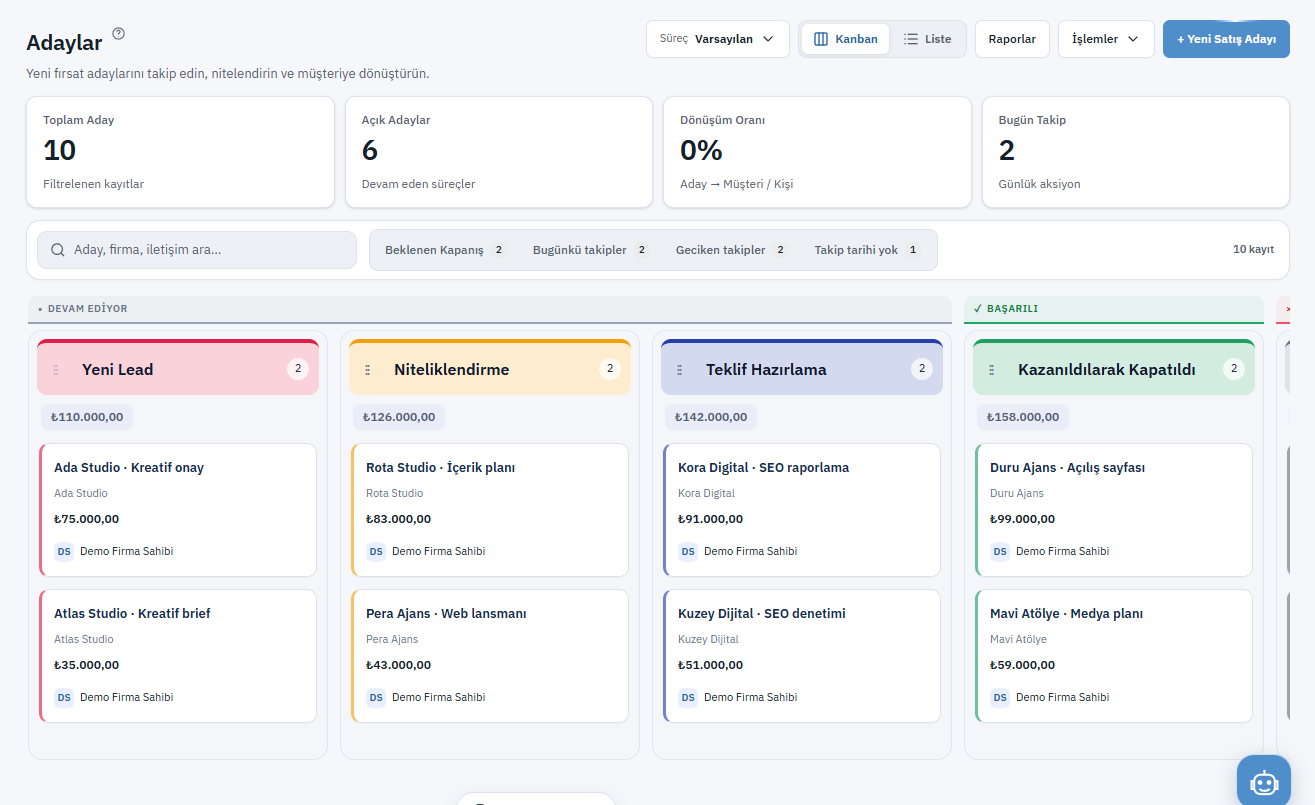
Keep each lead’s source, owner and conversation history together. Once the request is clear, continue tracking the sale as an opportunity.
Opportunities
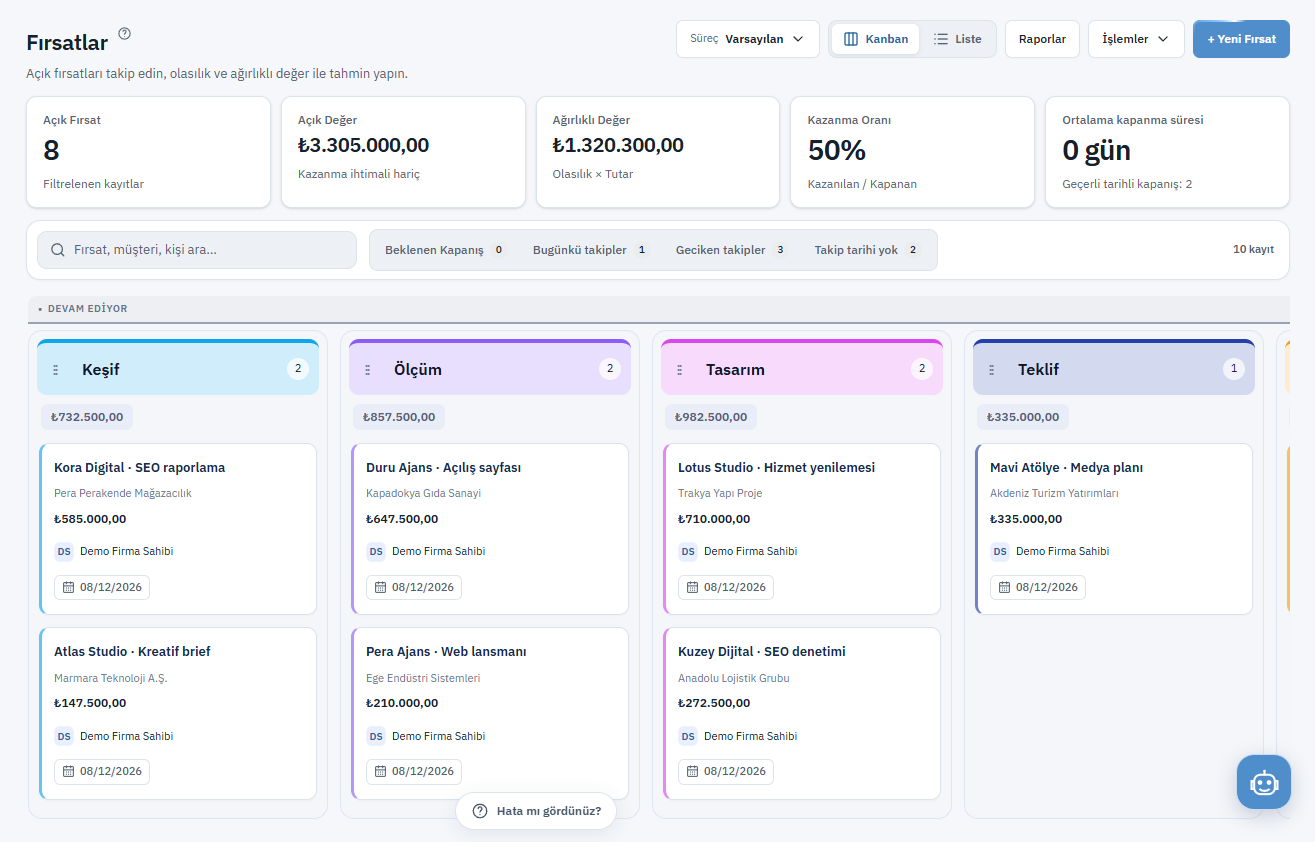
Track proposals by stage on the Kanban board. Set expected close dates and follow-up dates so the team knows which client to contact and when.
Sales intelligence
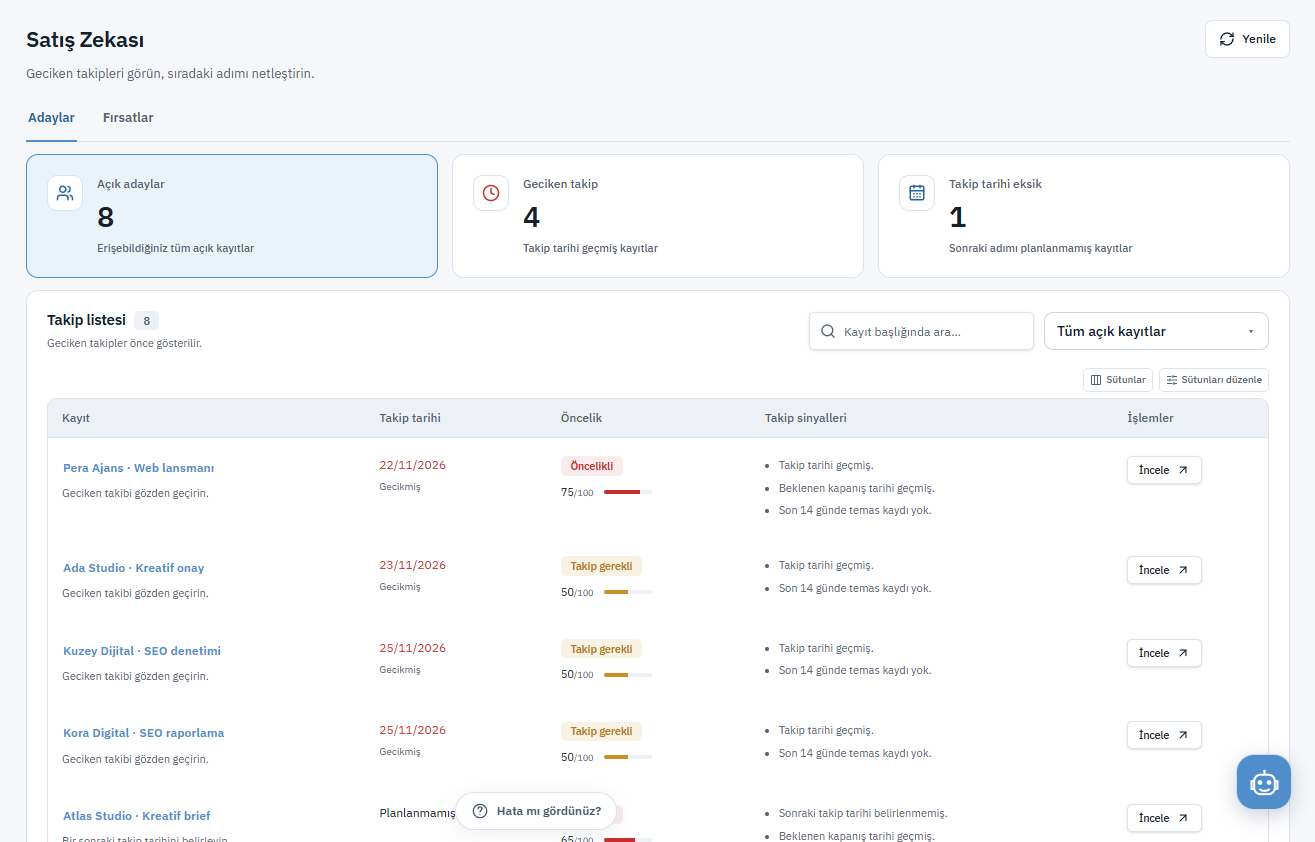
See overdue follow-ups, missing follow-up dates and other risk signals across leads and opportunities. Understand each priority, open the record in a side panel and plan the next step.
Mon
- 09:00
- 10:30
- 13:00
- 14:30
Tue
- 09:00
- 10:30
- 13:00
- 14:30
Wed
- 09:00
- 10:30
- 13:00
- 14:30
Thu
- 09:00
- 10:30
- 13:00
- 14:30
Fri
- 09:00
- 10:30
- 13:00
- 14:30
Missing metadata
· Google Meet
Scheduled
Appointment management
Create Zoom, Google Meet or Microsoft Teams meetings from a CRM appointment. The join link from your connected account is added to the appointment and shared with invitees.
- Zoom
- Google Meet
- Microsoft Teams
Smart Process
Track audit findings through found, assigned, fixed and verified stages. Keep a redirect issue in verification until the team has checked the final URL.
To do
Missing metadata
In progress
Broken redirects
In review
URL verification
Visual BPA designer
Design workflows without code for automation-enabled Kanban modules, including Opportunities and Smart Processes. Connect conditions, actions and each branch outcome in a visual designer.
Check the discount when a record is being moved to a stage. Continue the transition for standard discounts; send discounts of 10% or more to a manager.
When a record changes stage
Discount rate≥ 10%
Manager approval
Approve
Resume the pending stage transition.
Reject
Notify the record creator and keep the record in its current stage.
Revise
Request extra information through selected fields and wait for the response.
- Custom module
- Create your own module with fields for the client, owner, due date and files.
- Pipelines
- Define a separate pipeline for each workflow in the same module. Give creative approvals and contract renewals their own stages.
- Kanban
- Kanban columns show the pipeline stages. Move a card when the work advances and open it to see the owner and details.
- Renewals
- Set a renewal date on the record. For example, schedule follow-up 30 days before expiry and track the offer in the renewal pipeline.
- Reminders and notifications
- Schedule a reminder before a due date. Configure a rule to notify the owner when a record enters review.
- BPA automation
- Use the visual BPA designer to connect triggers, conditions and actions. For example, request approval when a record enters review, then create a publication task after approval or return it for revision.
Projects and tasks
Split technical fixes and content updates into separate tasks within one client project. Assign owners and due dates before the monthly reporting cutoff.
- Content and metadata Missing metadata
- Redirect fixes Broken redirects
- Technical validation URL verification
Reminders
Schedule a reminder to verify fixes before the client’s monthly review. If a fix is still open, bring its owner and next action into the review.
SEO agencies
Review the next milestone
- Review the next milestone
- Client follow-up
Renewal management
Plan the SEO renewal before the last reporting period closes. Review completed fixes and the next quarter’s priorities so the client sees what the renewal will cover.
Open the next term on schedule
Create a renewal rule from a successful service record. Set the reference date and recurrence. XtraCRM copies selected fields to a new record in the first active stage and notifies the people you select.
- Reference date field
- Renewal date
- Recurrence
- Every year
- When to open the new record
- 3 days before
New record opens
Renewal date
Team Collaboration
- Tasks
- Create a banner task with dimensions, source files and a checklist for links, copy and mobile previews. Assign a designer and record the deadline and time spent.
- Projects
- Group web, content and media tasks into one launch project. Use the calendar and Gantt view to track handoffs and review the launch date when the site test slips.
- Operations
- For a monthly client operation, keep the owner, client and current stage on one record. Review whether the report is being prepared, awaiting review or already delivered.
- Flows
- Define who takes over from brief to production, approval and publication. Set target times for each step and inspect how long the work has waited in client approval.
- Scrum
- Put SEO findings into the backlog, then choose redirect and metadata fixes for a two-week sprint. Define done as verifying the final URL and metadata after release.
- Work Reports
- Set a weekly report plan. Have specialists share completed work, blockers and next steps. The manager can request a revision when an item lacks context.
- Performance
- Compare delivery times, workload and recorded work time before planning the next week. If design is overloaded, review assignments before accepting another deadline.
Frequently asked questions
What does an SEO agency do and how is the monthly SEO service managed?
The SEO agency supports the site to be found in organic searches and reach the right visitors. The scope of work may consist of steps such as technical review, keyword research, content planning and performance tracking. Record the current status of the site in the first month and share priority issues with the customer. For example, if there are category pages on the e-commerce site that cannot be crawled, it may be necessary to plan the technical correction before the content production schedule. The responsible team, delivery date and acceptance criteria should be clear for each job.
In XtraCRM, you can track customer, monthly service agreement and project tasks together. Regularly record completed work, steps awaiting customer approval, and future work to be done. Add data from sources such as Search Console to the monthly report and explain which studies you observed the results with. Before the renewal meeting, review work done during the semester, changing priorities, and unresolved technical issues. Determining the scope of the new period according to current needs makes the service provided by the agency more understandable.
How to do technical SEO analysis and translate the problems found into tasks?
Technical SEO analysis begins with examining the issues that affect how search engines find, crawl, and index the site. Sitemap, robots rules, redirects, canonical addresses, pages returning errors and mobile experience are the first checkpoints. For each finding, include an example URL, date of observation, and a brief explanation of why it is important. Determine how many pages the issue affects and which team is expected to fix it. Prioritize based on business impact and dependencies of the solution.
In XtraCRM, you can open findings as a Smart Process record or project task. For example, if the main category from the product pages is given an incorrect canonical, add the sample pages, expected target and recheck step to the task. Once the developer has completed the fix, review the current output of the page and save the test result. The effect of some corrections may be reflected in the data with a delay. Explaining to the customer separately which work has been implemented and which result is still being monitored makes the monthly report more understandable.
How to do SEO keyword analysis and transfer it to the content plan?
In keyword analysis, first list the products and services offered by the customer, the regions they target and the questions asked by users. When aggregating queries based on similar words, also check search intent. A term can attract those who want to get information and those who want to get an offer at the same time. Examine what page types appear in search results. If there is already a suitable page on the site for a topic, evaluate whether updating the existing content is sufficient before opening a new page.
In XtraCRM, you can open a task on each target page to turn the research into an implementation plan. The record should include the main topic, target URL, short brief showing the purpose of the content, responsible person and publication target. For example, if there are two articles describing the same service, the editor clarifies which content will be updated and which page will be the main target. Set a measurement date after publication and observe visibility in relevant queries. Thus, the research dossier turns into a real content calendar that the team can follow.
How to conduct SEO competitor analysis and prioritize the results in the project?
For SEO competitor analysis, first find the pages that actually appear in the queries the customer wants to appear for. A company that is a competitor in the commercial field may not be a competitor for every search. Look at the results for the same query by content type, scope, product categories, and how they answer user questions. Record your observations with sample URL and date. Instead of working on every difference, separate opportunities related to the service offered by the customer and his target audience.
Turn findings into actionable work on the XtraCRM Projects and Tasks side. For example, if competitors describe product comparisons in detail and the customer site lacks a selection guide, assign a task to the content team with examples and expected scope. To evaluate the impact of a change on organic results, note the current status before release. Separate recommendations made, scheduled, and postponed at the monthly meeting. This layout moves competitor analysis from a general presentation to a work plan where decisions and results can be tracked.
How to prepare an SEO report and present a technical SEO audit to the client?
In the SEO report, first indicate the period and the site reviewed. For the technical audit, prioritize the issues and write sample URL, expected fix, and responsible team for each significant finding. In the Performance section, specify the source of metrics such as organic visibility, clicks, and conversions, if any. If a page has just been published, write the publication date so the data can be interpreted. If there are tasks that require the customer to make a decision, summarize them at the beginning of the report.
In XtraCRM, you can associate the report with the customer or project record and track suggestions as tasks. For example, a redirect error seen in the audit is assigned to the developer. When the solution is published, the retest result and closing date are kept in the same task. While the next report is being prepared, the open works of the previous period are reviewed through the project. Even if the person preparing the customer report changes, the source from which the data came, what work was completed and what decision is expected in the next meeting can be found in the records.
What does Google Search Console do and how is it reflected in the organic traffic report?
Google Search Console is used to track a site's impressions, clicks, and some indexing status in Google Search results. When examining data, consider period, device, country, query and page filters. For example, visibility on a category page may increase while total clicks decline. Separating brand queries from other queries helps interpret the change more accurately. Clearly state which filters you used and the comparison period in the customer report.
You can add the report or link you receive from Search Console to the customer's project in XtraCRM. Define the work to be done as a result of the report as a separate task. For example, if it is necessary to re-evaluate the title of a page with increasing views but low clicks, the URL, recommendation, responsible person and control date are entered into the record. When observing the impact of the change at the next meeting, note other factors such as season, campaign, and site update. In this way, data presentation and the work done by the agency can be tracked clearly in the same project history.
How to create an SEO content plan and editorial calendar?
The SEO content plan determines which page will answer which user question. Once the research is complete, first separate the pages that will be updated and the topics that require new content. The editorial calendar may include the target query, content type, author, editor, client approval, and estimated publication time. For example, in a new category guide, define product selection, usage examples and redirection to relevant pages in the brief. If a published article is to be updated, specify the reason for the change and the priority sections.
In XtraCRM, you can organize content jobs in a dashboard with draft, editor review, customer approval and live stages. Include the relevant page address and sources studied in each record. Write the actual date when the content is published, the next check day if necessary, and who will measure. Check out the most awaited phase at the end of the month. For example, if customer approval is regularly delayed, adding this time to the delivery plan and determining the approval person from the beginning makes subsequent work more predictable.
What should be considered when choosing an SEO agency and how should the project expectations be written?
When choosing an SEO agency, look at the scope of service offered, report samples, those responsible and the expected contribution from the client team. Clarify in the first meeting whether technical fixes will be implemented by the agency or delegated to the client developer. Ask about the frequency of reporting and the criteria by which success will be evaluated. For example, in addition to ranking change, qualified organic visits, performance of target pages and completed technical work can be evaluated. It is important that the study plan and measurement method are understandable rather than a guarantee of results.
On the agency side, you can link discovery notes and the offered offer to the customer opportunity in XtraCRM. Once the initial scope, access principals, and first evaluation day are determined, communicate these to the project team. In cases where a request may be out of scope, explain the impact to the customer and record the date of the decision. Comparing the planned work with the actual work at the end of the first month allows expectations to be updated. When a new priority arises, you can re-evaluate the scope and deadline together.
How to track SEO contract and monthly service renewal?
The service period, work to be delivered, expected contributions from the customer team and reporting frequency should be clearly written in the SEO contract. Keep the start, end and renewal interview date in separate areas within the agency. When the contract ends, determine which works have been completed and which issues are left for the next period. For example, if the technical audit has been completed, measurement of fixes or content expansion may be a priority in the next period. Link the scope of the new proposal to these observations.
In XtraCRM you can schedule a follow-up reminder to the renewal lead before completion. In the client meeting, summarize the results of the last period, open tasks and future goals. Record updated dates when the approved service duration and scope changes. If renewal is postponed, specify the interim work plan and the date on which the decision will be reconsidered. When the agency manager tracks upcoming renewals in a separate view from project deliverables, he or she can both get back to the client on time and create next month's team plan more accurately.
How to prepare a site migration SEO checklist and task tracking?
The site migration SEO checklist starts with an inventory of existing URLs before publication. Match old and new addresses, test required redirects, and check sitemap, canonical, and crawl rules on the new site. Give priority to home pages that receive organic traffic and landing pages that convert. Release time, return plan and test supervisor should be determined in advance. List which jobs will be checked immediately after publication and which will be checked in the first week.
You can open a separate project or task group for migration in XtraCRM. Link pre-release, day-of-release, and post-release control tasks to different deliverables. For example, if an old product address goes to the wrong category in the first round of checking, add the sample address, expected destination, and responsible developer to the record. After the fix, test the routing again. Review indexing and performance data in Search Console at appropriate intervals. Explain to the customer through project records which issues have been closed and which changes continue to be tracked.
Your company’s size does not limit your access to XtraCRM features.
All system features are included in every plan.
And all the features still to come...
* Excludes the free plan.Starter
45 $
35 $
/ month
9 $
7 $
per user / month
420 $ / year
– better value
Billed monthly.
All modules included
- 5 users
- 10 GB storage
Growth
FOR GROWING TEAMS
105 $
75 $
/ month
7 $
5 $
per user / month
900 $ / year
– better value
Billed monthly.
All modules included
- 15 users
- 25 GB storage
Prefer to use your own server? · Talk to our team
Let's take the first step together
Let's talk about the bottleneck in your business.
Let's show the solution in the product.
Get advice from our experts. Let's talk about how XtraCRM can be used in your business, suitable packages and initial steps.
- Evaluation according to your business processes
- Support on package and module selection
- Your installation and data migration questions
Prefer to write directly?
[email protected]